Every time your customer waits on hold, it’s a clue your contact center is operating in a way that no longer fits 2026.
Your agents aren’t the issue, the system is. It reacts to demand instead of staying ahead of it. It sends routine questions to humans when AI could resolve them instantly. And it turns simple tasks into delays that your customers notice right away.
In 2026, contact centers can’t rely on bigger teams to fix these gaps. Budgets are tighter, volumes keep rising, and customers expect answers without friction. That’s why AI isn’t a side feature anymore, it’s becoming the engine that keeps operations efficient and predictable, especially for businesses now exploring modern custom contact center solutions to replace outdated workflows.
The contact centers pulling ahead aren’t adding people. They’re redesigning the workflow.If hold time still shows up in your day, that’s your signal: the system needs to evolve, not the team.
The Biggest AI Shifts in Contact Center Operations for 2026
AI hasn’t just improved a few workflows in 2026 but has changed how entire contact centers operate. The shift is moving teams away from reactive, manual handling toward systems that predict, automate, and guide interactions in real time. The subheadings below break down the biggest changes happening right now and why they matter for any business that wants to keep up.
- Predictive AI Takes Over Customer Interactions
Voice, chat, email, and social channels are no longer waiting for agents to interpret every request.
Predictive AI now reads intent early, spots patterns, and routes customers to the right place without friction. This cuts down on unnecessary transfers, reduces wait times, and lets agents focus on the work that actually needs their attention.
- Dynamic Automation Replaces Rigid IVR Menus
Static IVR menus simply can’t keep up with how customers communicate today.
Instead of forcing people through a series of buttons, AI builds dynamic IVR solutions that adjust based on context, history, and real-time signals. The experience feels clearer, faster, and far less frustrating for customers, and it trims call duration for the business.
- Real-Time Agent Assist Becomes Standard
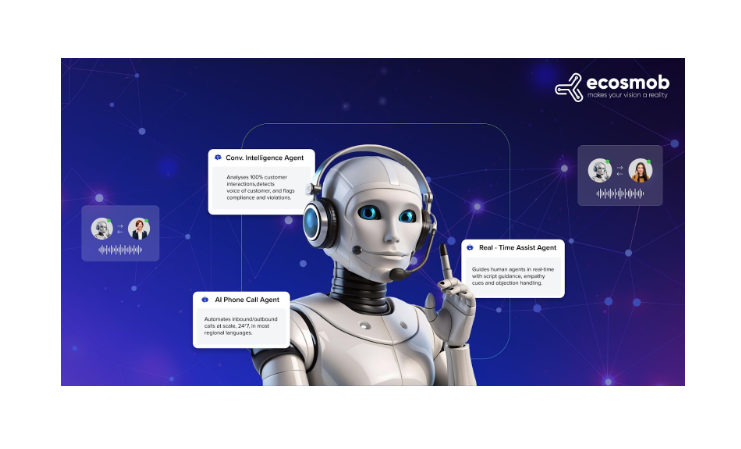
AI is now sitting alongside agents, not in place of them.
It surfaces relevant answers, flags important details, and gives live guidance based on the conversation. It acts like an AI receptionist, surfacing relevant answers, flagging important details, and giving live guidance based on the conversation. And because it can read sentiment as the call or chat unfolds, agents know exactly when to slow down, clarify, or escalate. It’s the kind of support that reduces errors and boosts customer satisfaction without adding more people.
- Delaying AI Adoption Comes With a Real Cost
Companies that hold off on AI aren’t just “late adopters” but are paying more to run the same operation.
Without AI call handling, manual routing stays slow, handle times stay high, and repetitive work keeps piling onto agents. As customer expectations rise and budgets tighten, this gap becomes expensive fast. Meanwhile, businesses that modernize early run leaner, respond quicker, and avoid the operational bloat that slows everyone else down.
With these shifts in place, the next thing leaders want to know is where the real cost impact shows up. So let’s break down which AI tools actually lower the cost per call or per interaction and how they do it.
How Does Artificial Intelligence in Contact Centers Improve First-Contact Resolution Rates?
If you look at most contact centers, the reason customers call back isn’t that agents don’t care, it’s because they didn’t get the right answer the first time. And that usually happens when agents don’t have the full picture, the context, or the time to dig for it.
AI changes that dynamic completely, because it removes the guesswork.
AI gives agents real context before they even pick up the interaction.
It pulls the customer’s history, previous tickets, sentiment cues, and recent touchpoints and lays everything out instantly. So instead of agents starting blind with, “How can I help you today?”, they start with clarity, and that alone eliminates a huge chunk of repeat calls.
It also suggests the best next action while the conversation is happening.
Not scripted lines, but real-time guidance based on what has worked across thousands of similar cases. When an agent knows what to ask next or which steps resolve the issue fastest, the odds of fixing it on the first try go up fast.
And when the issue is simple? AI handles it completely on its own.
Routine password resets, account checks, plan changes, shipping updates, customers get instant resolution without waiting for a human at all. And if you’ve already explored how AI voice automation streamlines these repetitive tasks, like the ideas covered in our AI voice bot–powered call center automation discussions, you’ll see why every resolved self-service interaction directly lifts your FCR rate. Those customers never have to “try again.”
Plus, AI catches the issues that normally slip through the cracks.
Maybe the customer sounds frustrated even though their words sound neutral. Maybe they mention a product name that signals a known problem. Maybe they pause before answering, and it hints they’re not confident the solution worked. AI picks up these signals and prompts the agent to double-check, confirm, or offer an alternative fix, which means fewer surprise call-backs later.
In simple terms:
AI doesn’t just speed things up; it helps agents close the loop properly the first time. And when customers walk away with a complete, confident solution, they don’t come back with the same problem, which is exactly what FCR is all about.
And if AI can solve issues faster, imagine what it can do when it can also forecast your workload with real accuracy.
What is AI-based Workload Forecasting, and How Accurate is it?
AI-based workload forecasting is the engine that finally stops contact centers from guessing. Instead of relying on last month’s volume patterns or rigid rules, it predicts future call, chat, email, and social traffic using a mix of historical data, real-time activity, seasonality, and behavioral trends.
How AI Forecasting Works?
AI looks for patterns humans usually miss.
It analyzes spikes, dips, channel shifts, customer behavior, and even how issues evolve over time. Instead of reacting to sudden rushes, the system already knows they’re coming, and adjusts staffing or automation capacity before the queue grows.
Why AI Outperforms Rule-Based Forecasting?
Traditional forecasting follows fixed rules like “Mondays are busy” or “weekends slow down.”
But AI models recalibrate every minute. They learn from new data, unexpected trends, and cross-channel movement. So even when demand changes suddenly, forecasts stay steady instead of falling apart.
How Accurate is AI Forecasting?
Here’s the part that actually moves the needle:
- AI forecasting engines can automate up to 50% of workforce-management tasks, freeing teams from manual scheduling and planning.
- AI-driven forecasting can cut demand-prediction errors by 20-50%.
These numbers aren’t fluff; they’re the difference between smooth operations and daily fire-drills.
Why This Accuracy Matters?
Better forecasting directly shapes customer experience.
When you know exactly how much demand is coming:
- Wait times shrink
- SLAs stop slipping
- Costs stay controlled
- Agents aren’t overloaded one hour and idle the next
This is why workload forecasting is one of the most practical, high-ROI uses of AI in the contact center, it fixes the operational issues customers feel first.
So if accurate forecasting can fix half the battle, what does it take to overhaul the rest of an outdated contact center with AI?
Let’s see!
How to Modernize an Outdated Contact Center with AI?
If your contact center still runs on old IVRs, siloed tools, and manual triage, you’re not alone, a lot of teams are in the same spot.
And the good news? You don’t have to replace everything at once. Modernizing with AI works best when you rebuild the system in layers, not one giant leap.
Here’s the practical flow most businesses follow when shifting from legacy workflows to AI-driven operations:
STEP 1. Audit the foundation
Before you plug in any AI tool, you need to know what you’re working with.
This is where you check:
- Your PBX or telephony system
- CRM, ticketing, and helpdesk tools
- IVR flows (especially the ones customers keep repeating… “press 1, press 2…”)
- Data sources that don’t talk to each other
- Places where agents handle tasks that AI could easily take over
And why start here?
Because AI only performs well when the groundwork is clean. And if your data is fragmented or your systems don’t sync, the kind of issues a VoIP-integrated CRM usually solves, the automation you add later will end up struggling.
STEP 2. Pick your first automation layer
Don’t automate everything at once, start with the “easy wins,” the repetitive stuff your agents spend far too much time on.
Usually, this includes:
- Password resets
- Order or delivery status
- Appointment reminders or updates
- Account info lookups
- Basic troubleshooting
These tasks don’t need human judgment every time, which makes them perfect for AI chatbots and voicebots.
This first layer frees up agents fast, and it gives your team confidence that AI isn’t here to replace them, it’s here to remove the clutter.
STEP 3. Add AI routing and real-time agent assist
Once the routine tasks are automated, the next step is improving the experience for both customers and agents.
Here’s where AI steps in to:
- Route conversations to the right queue or agent based on intent
- Prioritize high-value or high-risk conversations
- Real-time AI agent assistance with suggested replies, summarize context, or highlight key customer details in real time
And why does this matter?
Because this is the point where the system starts feeling proactive instead of reactive. Work moves smoothly, agents respond quicker, and customers stop bouncing around between teams.
STEP 4. Add AI analytics and forecasting
After routing and assistance, the next step is fixing the bigger operational issues, staffing gaps, unexpected volume surges, long wait times, and SLA misses.
AI-driven analytics gives you:
- Workload forecasting based on historical and real-time data
- Smarter scheduling
- Volume prediction during campaigns or product launches
- Trend analysis around customer issues
This is where you stop guessing tomorrow’s workload and actually plan for it.
STEP 5. Scale toward full AI-first operations
By now, the foundation is stable. You’ve automated the basics, improved routing, and fixed forecasting. This is when businesses move into true AI-first operations, where:
- All channels (voice, chat, email, social) run on one unified AI layer
- Models learn continuously from each interaction
- Compliance, security, and audit trails run automatically
- AI orchestrates multi-channel workflows without manual intervention
This doesn’t mean humans disappear, it means humans handle the meaningful cases, while AI handles everything else.
And when the foundation is finally modernized, the timing becomes impossible to ignore, 2026 is when the switch stops being a “future plan” and becomes the standard.
Why Businesses Are Switching to Artificial Intelligence in Contact Center Operations in 2026?
The shift isn’t happening because AI is trendy, it’s happening because the competitive gap is finally too wide to ignore. Companies that moved early are now running contact centers with lower costs, faster handling, and consistently higher satisfaction scores, while late adopters are still fighting slow queues, rising overhead, and customer frustration. And as customers lean toward quicker, AI-enabled responses instead of waiting for an agent, the old model simply can’t keep up. This is why more teams are turning to artificial intelligence in contact center operations, not as an experiment, but as the new baseline for staying relevant in 2026.
And businesses are more confident making the switch now because the AI adoption curve has matured. The tools are stable, the ROI is proven, and the risk is far lower than it was a few years ago.
Plus, leaders are finally asking the right question: how future-proof is the AI platform I choose today? Modern AI systems are built to evolve, new models plug in easily, automations scale with volume, and workflows expand without forcing a full rebuild. So the investment you make in 2026 doesn’t trap you; it actually sets you up for the next wave of customer expectations.
The B ottom Line?
The real differentiators in 2026 aren’t the contact centers that automate everything, or the ones that rely only on human expertise, it’s the teams that blend the two into one smooth system. AI handles the volume, the repetition, the forecasting, and the orchestration. Humans step in where judgment, empathy, and nuance are needed. And together, they create an operation that runs faster, costs less, and delivers support customers actually trust.
Businesses that embrace this balance now will widen the gap every month, with sharper forecasting, cleaner workflows, fewer bottlenecks, and customer experiences that feel effortless instead of exhausting. The ones who wait will spend 2026 trying to catch up to standards that have already moved ahead.
So if you’re planning your next move, don’t make this just another blog you read and save for “later.”Make it the point where you start building the contact center your customers expect, not the one your legacy systems allow.
Ecosmob’s AI-powered contact center solutions are built exactly for this shift, flexible, future-ready, and designed to help you modernize without rebuilding everything from scratch.
If you’re ready to see what an AI-first operation actually looks like, let’s build it together.