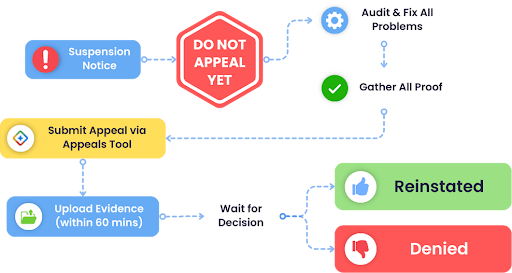
If your Google Business Profile (GBP) suddenly drops out of Google Maps, it usually feels random. In most cases, it isn’t. It’s Google reacting to a verification prompt, a policy issue, a duplicate listing, or a recent change that triggered an automated review.
Google frequently re-reviews listings after edits to name, address, category, or ownership. This guide keeps it simple and practical, so GBP recovery is not guesswork. You’ll run a few quick checks, fix the most common issues inside your profile, then clean up the off-site signals that can keep you stuck.
Quick Checks First
Before you edit anything, confirm what is actually happening.
- Search your business name in Google Search and in Google Maps using an incognito window
- Log in to the account that manages the profile and confirm you see “Edit profile” or “Manage”
- In your GBP dashboard, look for banners like verification needed, disabled, suspended, or changes under review
- Think back to the last few weeks and list any edits you made to name, address, category, website, or service areas
These checks tell you which fix to start with.
The Top Reasons Listings Disappear
Most missing listings fall into one of these buckets.
- Verification or ownership problems
- Suspensions and guideline issues
- Recent edits that triggered a re-review
- Duplicate listings or merge conflicts
- Address and pin placement problems
- Category and service mismatch
- Inconsistent business details across the web
Fix 1: Verification and Ownership Issues
If verification is pending, your visibility can drop until it is completed.
What to do:
- Open the location in your GBP dashboard and complete the verification method shown
- Confirm the profile is managed under the right Google account
- If ownership changed, request access through the profile ownership flow
Helpful proof when Google requests documentation:
- Storefront signage photo for public locations
- Utility bill or registration matching your business name and address
- A website contact page that matches your profile details
If you are a service area business and customers do not visit your address, hiding the address and using service areas reduces repeat verification problems.
Fix 2: Suspensions and Reinstatement
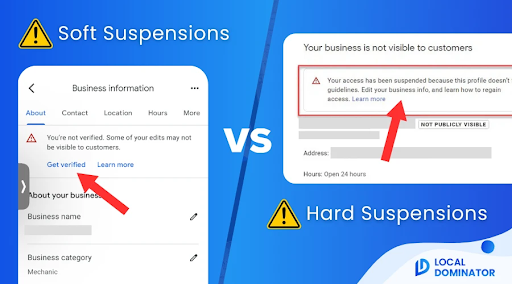
Suspensions often come from mismatched information or details that look like keyword stuffing.
Common triggers:
- Business name includes extra keywords or location terms that are not part of the real name
- The address is not a real staffed location, or it conflicts with your business type
- Categories do not match what you actually provide
- Duplicate listings exist for the same business
Clean up before requesting reinstatement:
- Business name should match signage and real-world branding
- Address and service areas should reflect how you truly operate
- Categories should be tight and accurate
- Phone and website should be correct and consistent
Then submit the reinstatement request with clean documents. Avoid making extra edits right after you submit.
Fix 3: Duplicate Listings and Merge Problems
Duplicates can cause Google to filter one listing out or show the wrong one.
How to spot duplicates
- Search your business name, phone number, and address in Maps
- Look for older names, old addresses, or listings created by past staff
If you manage both listings
- Keep the best listing with the correct history
- Remove or merge the weaker duplicate through GBP options
If you do not manage the duplicate
- Use “Suggest an edit” for clearly wrong info
- Report it if it is impersonating your business
Fix 4: Address and Pin Placement Problems
Sometimes the listing is there, but the pin or address settings make it hard to surface.
What to do:
- If customers do not visit your location, hide the address and set realistic service areas
- Adjust the map pin to the true entrance or building location
- Keep your address formatting consistent everywhere, including suite numbers
Repeated pin edits can trigger extra reviews, so fix it once, then leave it stable.
Fix 5: Category and Service Mismatch
Google expects your primary category to match your main service. Overloading categories can hurt trust.
What to do
- Choose one primary category that matches what you do most
- Add only a few secondary categories that truly apply
- Make sure your services list reflects what customers can actually buy from you
If your website messaging and profile categories conflict, visibility may drop during review cycles.
Fix 6: NAP Consistency and Off-site Trust Signals
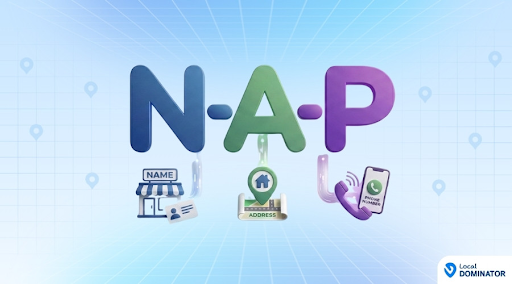
NAP means name, address, and phone number. If these vary across listings, Google gets mixed signals.
Where to align details:
- Your website contact page and footer
- Major directories and social profiles
- Old listings from previous addresses
- Any niche directories in your industry
During GBP recovery, consistency matters more than volume. A structured process helps when you are cleaning up multiple issues at once.
Prevention Checklist
Once your listing is back, these habits help you stay stable.
- Avoid frequent edits to name, category, and address
- Keep a small change log of what you edited and when
- Keep the same NAP everywhere online
- Check for duplicates every few months
- Add photos and posts occasionally so the profile stays active
- Respond to reviews in a normal, human way
Final Thoughts
Most “missing” listings return once you identify the correct issue and stop making repeated changes. A steady workflow for Google Business Profile Management makes that easier to maintain over time. You can use tools like Local Dominator to help with this.
Local Dominator is a cloud-based Search Everywhere Platform specializing in unified local SEO and AI search tracking for local agencies and businesses. It serves as a single source of truth that integrates SERP analytics and citations to make visibility simple, predictable, and scalable across all digital touchpoints.